

bizhub 227 Refurbished Printers
KM Connect South Africa
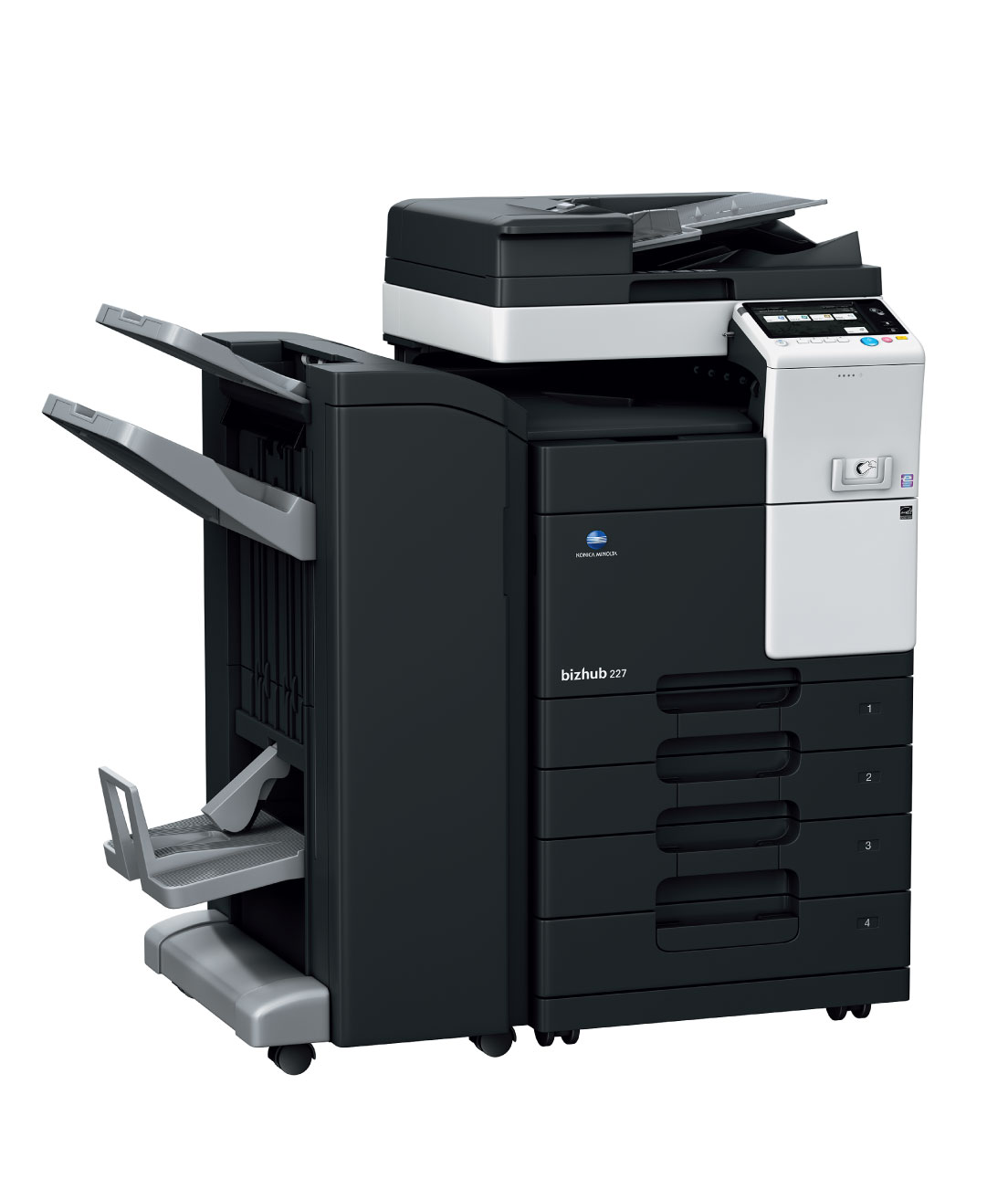
bizhub 227 Refurbished Black & White Printers
The bizhub 227 provides productivity features to speed your output economically, including 22 ppm printing, colour scanning, powerful finishing options for right-size scalability and enhanced control panel which now features a new mobile connectivity area.
- 22 PPM
- Stylish & Functional Exterior Design
- A4/A3
- Data Encryption
- Postscript & PCL
- Scan to e-mail
- 2×500 Sheet tray
- 100 Sheet bypass
- 320GB HDD
- Colour Scanning





Key Features
- Speed A4/A3: 22/14 ppm in black & white
- Paper formats: A5-A3
- Cost effective A3 black & white multifunctional printer
- State-of-the-art mobile print technology
- Perfect for the small office
- The bizhub 227 multifunction printers from Konica Minolta have a print/copy output of up to 22 ppm to help keep pace with growing workloads
- Features a multi-touch interface for intuitive control — with LEDs that allow visual confirmation from a distance, plus optional Voice Guidance system to provide audible control instructions
- The intuitive touchscreen interface has been improved with a new mobile touch area to support NFC
- Enhance your productivity with control-panel access to downloadable apps from the bizhub MarketPlace
- An optional 10-key pad provides hard keys to make numerical entry quick and sure
- Downloadable apps from our bizhub Marketplace to improve your productivity.
- Konica Minolta participates in EPEAT, a ratings standard for measuring electronics products’ environmental impact.
Functionalities
MyTab
Print driver customisation
Carbon Copy print
Single page printing from multiple trays
Smart job queue
Unprintable jobs e.g. because of unavailable paper size (copy, print and fax) are bypassed by consecutive jobs
Direct print
Driverless printing of PDF, XPS, DOCx, XLSx, PPTx, JPEG, TIFF, PS and PCL
Toner save mode
Helps save toner by reducing toner consumption e.g. for draft prints
Mobile Printing
Possibility to directly print documents from a mobile device
Copy
Card shot
Prints copies of the front and back of the original on the same page, e.g. for passport and other ID
Job preview
Illustrates selected copy functions on screen
Custom function bar
Up to 2 x 7 copy functions can be freely selected for the main copy screen
Blank page removal
Automatic deletion of blank pages e.g. when copying mixed simplex and duplex documents
Scan
Scan-to-Me/Home
Direct scan to own email address (Me) or SMB folder (Home) based on Active Directory information
Scan preview
Provides a real-time preview of scanned originals for checking before sending
Scan annotation
Stamping of e.g. date/time, filing number or custom text on scans for archiving purposes
Scan programs
Pre-setting of original, scan file and destination for regular scan jobs
Blank page removal
Automatic deletion of blank pages e.g. when scanning mixed simplex and duplex documents
Fax
IP-Fax
Sending of fax messages via network between Konica Minolta MFPs; supports colour as well as black & white
PC-Fax
Direct fax transmission from the PC
Fax forwarding
Forwarding of incoming fax documents by email or to SMB folder instead of printing
Shared address book
The MFP-internal address book can be shared with the PC fax client
Tray selection
Choice of input tray / print media and output tray for easy visibility of incoming faxes
Box
Box function
Storing of print, copy, scan and fax jobs for recall to send and print – for frequently printed documents like brochures, forms, pricelists etc.
Personal, Group and Public
User access definition for different boxes
Sharing
Copying of documents from user box to user box
Online access
User box file access via web browser or box operator utility
Auto deletion
Automatic deletion of files stored in a user box after a predefined period
Security
Authentication
User access by password, user name + password, ID card or finger vein scanner
Access rights
Function access rights can be granted on user level (up to 1,000 accounts on MFP)
Data encryption
Encryption of data stored on hard disk and password protection for hard disk access
Temporary data deletion
Copy, print, scan and fax job data are automatically deleted after job completion
Network security
Support for SSL/TLS, HTTPS, 802.1x and IPsec
Specifications
Copier Specifications
| Copying process | Electrostatic laser copy; indirect |
|---|---|
| Toner system | Simitri® HD polymerised toner |
| Copy/print speed A4 mono (cpm) | Up to 22 cpm |
| Copy/print speed A3 mono (cpm) | Up to 14 cpm |
| Autoduplex speed A4 mono (cpm) | Up to 22 cpm |
| 1st Copy/print time mono (sec) | 5.3 sec. |
| Warm-up time (sec) | Approx. 20 sec. Warm-up time may vary depending on the operating environment and usage |
| Copy resolution (dpi) | 600 x 600 dpi |
| Gradations | 256 gradations |
| Multi-copy | 1 – 9,999 |
| Original format | A5 – A3 |
| Magnification | 25-400% in 0.1% steps; auto-zooming |
| Copy functions | Chapter; cover and page insertion; proof copy (print and screen); adjustment test print; digital art functions; job setting memory; poster mode; image repeat; overlay (optional);stamping |
Printer Specifications
| Print resolution (dpi) | 1,800 (equivalent) x 600 dpi |
|---|---|
| Page description language | PCL 6 (PCL 5 + XL 3.0); PostScript 3 (CPSI 3016); XPS |
| Operating systems | Windows VISTA (32/64) Windows 7 (32/64) Windows 8 (32/64) Windows 8.1 (32/64) Windows 10 (32/64) Windows Server 2008/2008 R2 (32/64) Windows Server 2012/2012 R2 (64) Macintosh OS X 10.x Unix; Linux; Citrix |
| Printer fonts | 80 PCL Latin; 137 PostScript 3 Emulation Latin |
| Print functions | Direct print of PCL; PS; TIFF; XPS; PDF (v1.7); encrypted PDF files and OOXML (DOCX; XLSX; PPTX); mixmedia and mixplex; “Easy Set” job programming; overlay; watermark;copy protection; carbon copy print |
| Mobile printing | AirPrint (iOS); Mopria (Android); Google Cloud Print (optional); Wi-Fi Direct (optional); Konica Minolta Print Service (Android); PageScope Mobile (iOS); NFC Authentication and Pairing (Android) |
Scanner Specifications
| Scan speed colour (opm) | Up to 45 ipm |
|---|---|
| Scan Speed mono (opm) | Up to 45 ipm |
| Scan resolution (dpi) | Max.: 600 x 600 dpi |
| Scan modes | Scan-to-eMail (Scan-to-Me) Scan-to-SMB (Scan-to-Home) Scan-to-FTP Scan-to-Box Scan-to-USB Scan-to-WebDAV Scan-to-DPWS Network TWAIN scan |
| File formats | TIFF; PDF; Compact PDF; JPEG; XPS; Compact XPS; DOCX; XLSX; searchable PDF; PDF/A; linearized PDF |
| Scan destinations | 2,100 (single + group); LDAP support |
| Scan functions | Annotation (text/time/date) for PDF; up to 400 job programs;Real-time scan preview |
Fax Specifications
| Fax standard | G3 |
|---|---|
| Fax transmission | Analogue i-Fax Colour i-Fax (RFC3949-C) IP-Fax |
| Fax resolution (dpi) | Max.: 600 x 600 dpi (ultra-fine) |
| Fax compression | MH; MR; MMR; JBIG |
| Fax modem (Kbps) | Up to 33.6 Kbps |
| Fax destinations | 2,100 (single + group) |
| Fax functions | Polling; time shift; PC-Fax; receipt to confidential box;Receipt to e-mail/FTP/SMB; up to 400 job programs |
User Box Specifications
| Max. storable documents | Up to 3.000 documents or 10.000 pages |
|---|---|
| Type of user boxes | Public Personal (with password or authentication) Group (with authentication) |
| Type of system boxes | Secure print Encrypted PDF print Fax receipt Fax polling |
| User box functionality | Reprint; combination Download Sending (e-mail/FTP/SMB and fax) Copy box to box |
System Specifications
| System memory standard (MB) | 2,048 MB (standard) |
|---|---|
| System hard disc optional (GB) | 250 GB (standard) |
| Interfaces standard | 10-Base-T/100-Base-T/1,000-Base-T Ethernet; USB 2.0; Wi-Fi 802.11b/g/n (optional) |
| Network protocols | TCP/IP (FTP; SMB; SMTP; WebDAV) (IPv4/IPv6) |
| Frame types | Ethernet 802.2; Ethernet 802.3; Ethernet II; Ethernet SNAP |
| Automatic document feeder | Up to 100 originals; A6-A3; 35-163 gsm RADF optional available |
| Paper size | A5-A3; A6S; Thick Paper X/Y size input range: Width:90-297 mm; Length: 139.7-431.8mm |
| Printable paper weight (g/m²) | 60-220 gsm |
| Paper input capacity (sheets) | Standard: 1,100 sheets Max.: 3,600 sheets |
| Paper trays standard | Tray 1: 500 sheets; A5-A4; 60-220 gsm Tray 2: 500 sheets; A5-A3; 60-220 gsm Manual Bypass: 100 sheets; A6-A3; custom sizes; 60-220 gsm |
| Paper trays optional | Tray 3: 500 sheets; A5-A3; 60-220 gsm Tray 3 + 4: 2 x 500 sheets; A5-A3; 60-220 gsm Large Capacity Cabinet: 2,500 sheets; A4; 60-220 gsm |
| Automatic duplexing | A5-A3; 60-209 gsm |
| Finishing modes (optional) | Offset; group; sort; staple; punch; centre-fold; letter fold; booklet |
| Output capacity (w. finisher) | Max.: 3,300 sheets |
| Output capacity (w/o finisher) | Max.: 250 sheets |
| Stapling | Max.: 50 sheets or 48 sheets + 2 cover sheets (up to 209 gsm) |
| Stapling output capacity | Max.: 1,000 sheets |
| Letter fold | Up to 3 sheets |
| Letter fold capacity | Max.: 30 sheets (tray); unlimited |
| Booklet | Max.: 20 sheets or 19 sheets + 1 cover sheet (up to 209 gsm) |
| Booklet output capacity | Max.: 100 sheets (tray); unlimited |
| Copy/print volume recommended (monthly) | 10,000 |
| Copy/print volume max. (monthly) | 19,000 If the maximum volume is reached within a period of one year, then a maintenance cycle must be performed |
| Toner lifetime Black | 23,000 pages |
| Imaging Unit lifetime Black | 80,000 pages/600,000 pages (Drum/Developer) |
| Power consumption | 220-240 V / 50/60 Hz; Less than 1.5 kW (system) |
| System dimensions (WxDxH, mm) | 585 x 660 x 735 mm (Standard configuration of main body) |
| System weight (kg) | Approx. 56.5 kg |
System Features
| Security |
|
|---|---|
| Accounting | Up to 1,000 user accounts; Active Directory support (user name + password + e-mail + smb folder) User function access definition Biometric authentication (finger vein scanner) optional ID card authentication (ID card reader) optional |
| Software |
|
Full Cost Breakdown of a Refurbished bizhub 227 for Businesses
South African businesses seeking dependable, efficient printing solutions often look to refurbished multifunction printers as a cost‑effective alternative to brand‑new devices. The refurbished Konica Minolta bizhub 227 is a versatile unit that delivers sharp output, solid reliability, and workflow flexibility — making it suitable for offices, institutions, and workgroups throughout South Africa.
At KM Connect SA, the emphasis is on helping organisations understand the elements that influence the purchase price of a refurbished device and guiding you toward the acquisition strategy that best supports your business goals.
What Determines the Cost of a Refurbished Printer?
Rather than focusing on a specific figure, it’s important to understand the factors that influence what a business should expect to invest when purchasing a refurbished Konica Minolta bizhub 227 through KM Connect SA:
- Condition and refurbishment standards: Each unit undergoes professional testing and servicing to ensure performance and reliability.
- Service and support packages: Warranty options and maintenance agreements strengthen long‑term value and uptime protection.
- Printer configuration: Optional enhancements like additional paper trays or finishing tools may affect value and functionality.
- Delivery and installation across South Africa: Efficient setup tailored to your site helps integrate the printer seamlessly into your workflow.
- Ongoing support agreements: Structured maintenance plans reduce the risk of unexpected repair costs.
Understanding these components empowers South African businesses to evaluate value beyond the upfront number and focus on long‑term performance and productivity.
Buying vs Leasing: Choosing What Works Best
When acquiring a refurbished Konica Minolta printer through KM Connect SA, your business can choose between buying the unit outright or leasing it through flexible terms. Each option offers strategic advantages depending on your financial planning and operational priorities.
Buying
Purchasing your refurbished bizhub 227 means your business gains full ownership of the device. This pathway works well when:
- You have consistent and predictable printing requirements.
- You prefer treating the printer as a long‑term business asset.
- You want full control over device configuration and use.
Ownership provides the freedom to customise and operate the device without ongoing financial commitments.
Leasing
Leasing a refurbished printer through KM Connect SA presents a compelling alternative for many South African organisations. Benefits of leasing include:
- Preserving working capital by reducing upfront spend.
- Predictable monthly payments that assist with budgeting.
- Inclusive support and maintenance options that protect uptime.
- Flexibility to upgrade as business needs evolve.
For organisations that prioritise financial flexibility, predictable costs, and strong support structures, leasing often presents a strategic choice. KM Connect SA works with you to assess needs and cash flow strategy to help determine whether buying or leasing is the best fit.
Why South African Businesses Choose KM Connect SA
Selecting the right refurbished Konica Minolta solution is more than choosing hardware — it’s about partnering with a provider who understands your business environment. With KM Connect SA, you benefit from:
- Local expertise tailored to South African business challenges and workflows.
- Flexible acquisition options including both purchase and lease.
- Comprehensive support and service offerings designed to protect uptime and productivity.
- Quality‑assured refurbished devices ready to perform in high‑demand environments.
This customer‑focused approach ensures that your investment in a refurbished Konica Minolta printer delivers reliable performance and long‑term value.
FAQs
What factors influence the purchase price of a refurbished Konica Minolta bizhub 227?
Condition, refurbishment quality, included support packages, printer configuration, and delivery/setup logistics all play a role. KM Connect SA prioritises quality and tailored options to suit business needs.
Should my business buy or lease a refurbished printer?
Buying is ideal if you prioritise long‑term ownership and asset control. Leasing often works well when preserving working capital, accessing inclusive support, and maintaining predictable costs are important.
Can a refurbished bizhub 227 integrate with modern office workflows?
Yes. The bizhub 227 supports network connectivity, mobile printing, and integrates smoothly with typical office IT environments.
Does KM Connect SA offer support after purchase?
Absolutely — support and maintenance packages are available to keep your refurbished printer operating reliably and efficiently.
Are refurbished printers accessible throughout South Africa?
Yes. KM Connect SA serves businesses across South Africa, ensuring access to quality refurbished Konica Minolta equipment regardless of location.
Take Action
Upgrade your organisation’s printing capabilities with a refurbished Konica Minolta bizhub 227 from KM Connect SA. With personalised support and flexible acquisition options designed for South African businesses, you can secure a printing solution that aligns with your operational needs and financial goals.
Contact KM Connect SA today to request a quote to discuss your requirements and get expert support to choose the ideal printing solution for your business.
View more Refurbished Multifunctional Printers Available.
Experience unlimited possibilities and solutions when dealing with KM Connect SA.
Contact our authorised dealer’s team today.
Prefer to talk it through first? Call us: 010 593 9199
Dealer insights: the bizhub 227 in our service department
Who we see buying this model. The 227 is our starter mono machine: small offices, reception areas and second machines placed beside a bigger unit. Buyers asking for it usually know the model by name, often from running one before, and it is regularly ordered in pairs for branch offices.
What to know before you choose it. Ask about stand and cabinet options with your quote; several buyers have added the cabinet and extra trays after delivery, and bundling them upfront costs less than a second site visit.
How it compares to the next tier. Offices growing past roughly 2,500 pages a month are better served by the bizhub 287, which is the same machine family with more speed and paper capacity.
A question we field often. “Can you quote two units together?” Yes, quantity quotes on the 227 are common and priced with a volume discount.